SpeedRunners 2 Controls Cheatsheet
Keyboard and Xbox defaults on one page — pin it beside your monitor.
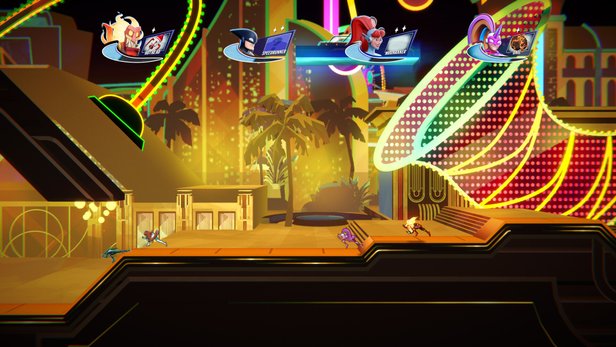
SpeedRunners 2: King of Speed lives or dies on input precision. One misbound slide key can drop you off the shared camera in an eight-player ranked lobby. This cheatsheet lists default PC keyboard and Xbox controller bindings in quick-reference tables so you can verify layouts without tabbing out of fullscreen. For rebind strategy, dead zones, and hybrid setups, continue to Controls Hub, PC Keyboard Controls, Controller Layout, and Rebind Tips.
PC keyboard defaults
| Action | Default key |
|---|---|
| Move left | Left Arrow |
| Move right | Right Arrow |
| Jump | Z |
| Grapple | X |
| Use pickup | C |
| Boost | Space |
| Slide | Down Arrow |
Movement on arrow keys keeps the action keys clustered on the left hand — a legacy SpeedRunners 1 layout many veterans prefer. WASD migrators should remap early in the Steam demo before ranked muscle memory sets.
Xbox controller defaults
| Action | Default button |
|---|---|
| Move | Left stick or D-pad |
| Jump | A |
| Slide | Y |
| Grapple | X |
| Use pickup | B |
| Boost | RT (Right Trigger) |
Console and Game Pass players should confirm prompts on their platform — Nintendo Switch and PlayStation use equivalent face buttons with different glyphs, detailed in Controller Layout.
Action quick definitions
Jump — clears gaps, initiates wall jumps on vertical surfaces. Slide — ducks under hazards and low tunnels; hold Down on keyboard or Y on Xbox while moving. Grapple — attaches to blue ceilings only; release at an angle to preserve speed (Movement & Grapple). Use pickup — fires or deploys the held item (Items Hub). Boost — spends boost meter for a horizontal burst; panic button when trailing the camera edge.
Keyboard vs controller pick guide
Choose keyboard if you prefer digital left/right taps and already use Z/X/C from SpeedRunners 1. Choose controller for couch co-op, Steam Deck, Xbox, PlayStation, or Switch sessions where thumb access to jump and slide feels natural. There is no authoritative competitive advantage — top demo players appear on both.
PlayStation and Switch glyph equivalents
PlayStation maps Jump to Cross, Grapple to Square, Pickup to Circle, and Slide to Triangle in the same layout family as Xbox — confirm in Controller Layout because on-screen tutorials may show Xbox glyphs even on Sony hardware. Nintendo Switch uses A/B/X/Y labels identical to Xbox naming in many ports; Pro Controller players should verify whether jump sits on B or A in system menus before ranked play.
Simultaneous inputs worth practicing
High-level lines often combine slide into jump, jump into grapple, and boost immediately after grapple release. Drill these pairs slowly in Local & Practice until your fingers stop hesitating. Taunt binds exist for celebration but should never share a finger with jump or grapple — check defaults in Rebind Tips if party nights get chaotic.
Ranked session bind checklist
Before your first ranked queue each day: test jump, slide, grapple, pickup, and boost once in the tutorial room. Confirm no Steam Input profile overwrote keyboard defaults. Console players should verify stick dead zones feel tight — loose sticks cause accidental slides on narrow ledges from Demo Maps.
Common mistakes this sheet prevents
- Confusing X (grapple) on keyboard with X (grapple) on Xbox — same letter, different hands.
- Sliding when you meant jump because Down arrow shares the movement column.
- Firing pickups accidentally because C sits near movement keys — rebind to a safer key via Rebind Tips.
- Holding RT for boost when meter is empty — watch UI meter near your character.
Warm-up drill (five minutes)
- Jump across ten gaps without sliding.
- Slide ten tunnels without jumping early.
- Grapple ten blue ceilings — release early on five, late on five to feel timing.
- Boost once per lap only — Local & Practice bots recommended.
Platform notes
Steam allows full remapping. Consoles may restrict certain system-reserved buttons. Always test binds in tutorial before joining ranked — see How to Play.
Related pages
Controls Hub · Practice Planner · Advanced Tech · Tools Hub
Pin this cheatsheet for launch week, then graduate to muscle memory. Inputs should be boring — your lines should not be.
Keep this page bookmarked
Revisit this Controls Cheatsheet after every demo patch and again on September 3, 2026 launch week. Cross-check binds in Controls, routes in Maps, and lobby types in Modes so your notes stay aligned with Fair Play Labs’ live build — page key: content\source\tools\controls-cheatsheet.json.
Frequently Asked Questions
Quick answers to the most common questions.
What is the keyboard jump key?
Z by default — full table on this cheatsheet and [Keyboard Controls](/controls/keyboard/).
What is Xbox grapple?
X button — see [Controller Layout](/controls/controller/) for PlayStation and Switch glyphs.
Can I rebind keys?
Yes on PC — read [Rebind Tips](/controls/rebind/) before ranked play.
Where is slide on keyboard?
Down Arrow while moving — pair with [Movement & Grapple](/guides/movement-grapple/) drills.
Need a practice schedule?
Use [Practice Planner](/tools/practice-planner/) after memorizing binds.